Home
MV
Premium MV
Music
Library
Subscribe
Blog
Select TemplateSee All
Legends style
Legends style
Recording Studio
Recording Studio
Stylized 3D
Stylized 3D
supercar
supercar
concert
concert
ClearSky Japanese
ClearSky Japanese
Pixel
Pixel
Expressionist Freakshow
Open-World Crime Game
Modern Tactical Warfare
Live-Action Anime Collision
1980s American Film Nostalgia
Cyberpunk
Cyberpunk
Showa Printing
Showa Printing
Interlocking Brick Toy Style
Italian Jazz Fashion Editorial
Dark Deco Cel Animation
Step 1Choose a song
MP3, WAV, M4A, etc. File size ≤50MB
Paste Link
Step 2

Add characters

LeadRequired
SupportingOptional

Use a clear, front-facing photo for each character.

The supporting character appears in story scenes.

Creative Settings
MV Title0/30
Author's Name0/30
Shorty Wanna B A Thug
Give you the blues (2nd versio
Big Cat (Nacho Dog)
Brings
Come Close
yelvin_grej_chernoglazaya_acou
I walked out (Remastered)
What Men Do
Shut Up Bring The Ligh
FOGO ARDENTE

Select MV Style

Template Library

Legends style
Recording Studio
Stylized 3D
supercar
concert
ClearSky Japanese
Pixel
Expressionist Freakshow
Open-World Crime Game
Modern Tactical Warfare
Live-Action Anime Collision
1980s American Film Nostalgia
Cyberpunk
Showa Printing
Interlocking Brick Toy Style
Italian Jazz Fashion Editorial
Dark Deco Cel Animation

Select Song

Loading...
HomeAI Music Video Generator

AI Music Video Generator

Muvio turns your audio into a music video that covers the whole song. Upload an MP3, WAV or M4A file, or paste a Suno link. Add your lead character's photo and choose Narrative, Anime or Performance.

Custom MV supports songs up to 5 minutes and audio uploads up to 50 MB. Choose 16:9 or 9:16, add optional lyric captions, and preview your video before generating the full version.

MP3, WAV, M4ASuno linksSongs up to 5 min16:9 and 9:16Lyric captions
Narrative MV sample, made with MuvioSee all styles

How to create an AI music video

Start with your audio and a character photo. Use a description to guide the video, or leave it blank.

  1. 01

    Choose your song

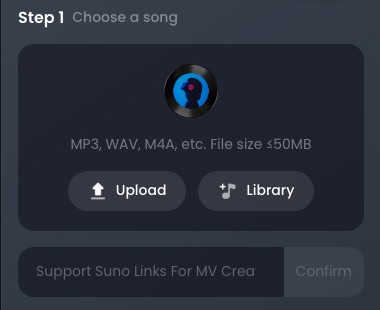
    Upload an audio file, select one from your library, or paste a Suno link. No song yet? Make one with the AI song generator.

    Step 1 in Muvio: upload MP3, WAV or M4A, pick from library, or paste a Suno link
  2. 02

    Add your characters

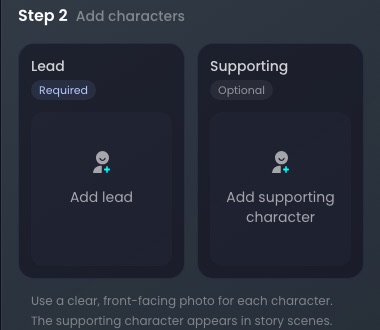
    Upload a clear, front-facing photo of your lead character (required). Add a supporting character if you want them to appear in story scenes.

    Step 2 in Muvio: add lead and supporting character photos
  3. 03

    Set the creative direction

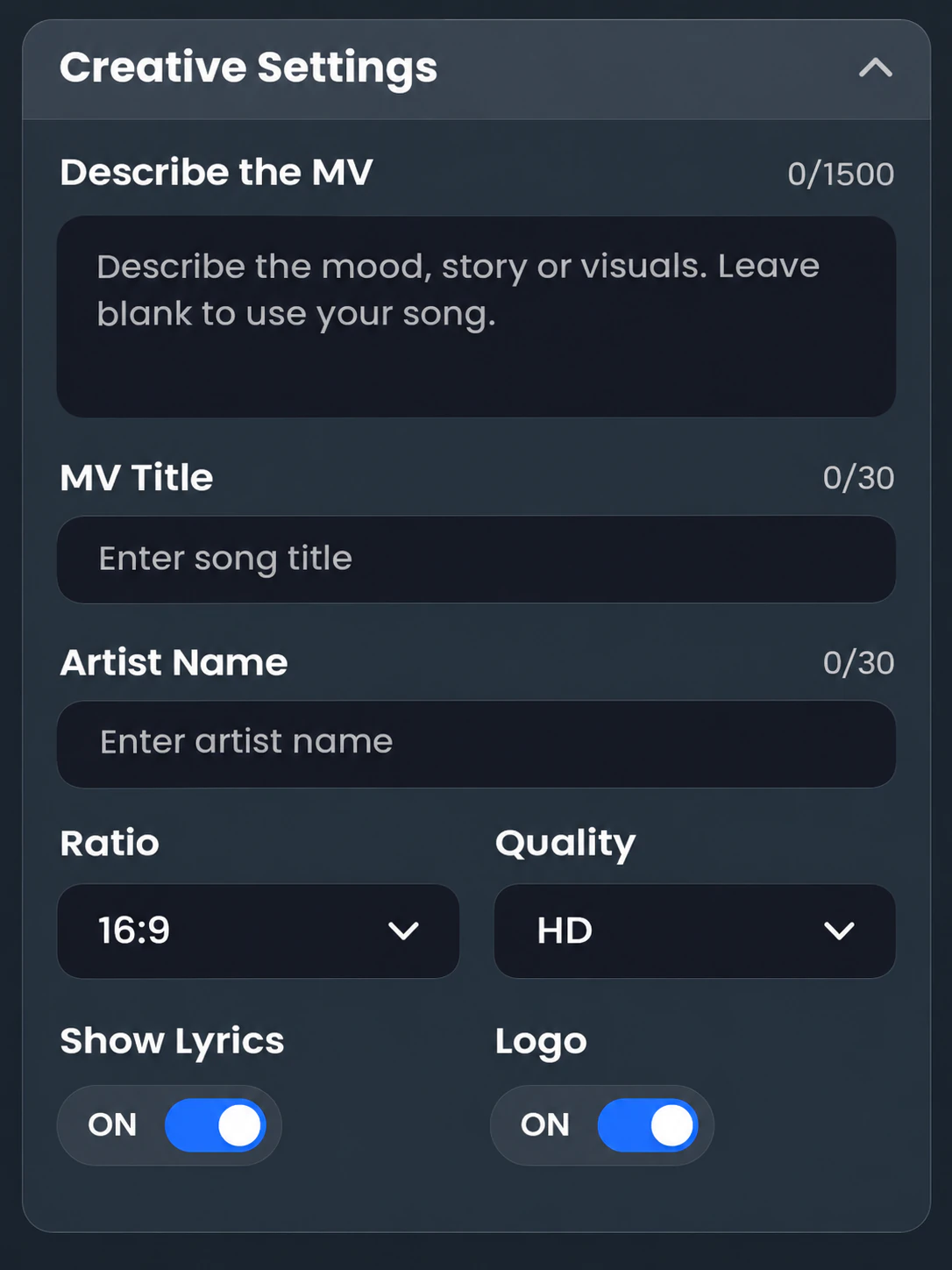
    Choose Narrative, Anime or Performance. Describe the emotions, plot or visuals in up to 1,500 characters, or leave it blank. Set your title, artist name, aspect ratio and quality, then choose whether to show lyrics and the logo.

    Creative settings preview: MV description, title, artist name, 16:9 ratio, HD quality, lyrics and logo
  4. 04

    Preview, then generate the full MV

    Click Generate MV Preview and review the result. When you are ready, generate the full music video. Full-video generation uses credits based on song length and quality. See the credit estimate below.

    Generate MV Preview10 Credits

Music video styles

Choose a story, an animated look or an artist performance. Use the examples to find a direction for your song.

Narrative AI music video style example

Narrative MV

Build a visual story around your song. Try a relationship, a journey or a memory as the starting point for your description.

Anime AI music video style example

Anime MV

Generate anime-style visuals for your track. Try it for J-pop, lo-fi or a song with a fantasy setting.

Performance AI music video style example

Performance MV

Put the artist at the center of the video. Try it when you want the feel of a stage or studio performance.

Pixel music video style preview

Pixel

A pixel-art look for a retro game-inspired video.

Cyberpunk music video style preview

Cyberpunk

A futuristic look for a neon city setting.

Template library

Recording Studio, Concert, Stylized 3D, Legends, 1980s Film Nostalgia and more. Switch to the Template tab, pick one and upload your character photo.

Custom MV specs at a glance

Input

Audio files
MP3, WAV or M4A, up to 50 MB
Links
Suno song links
Song length
Up to 5 minutes. The MV covers the whole song
Characters
Lead photo required; supporting character optional

Creative control

Styles
Narrative, Anime, Performance and style presets
Story prompt
Up to 1,500 characters, optional
Title and artist name
30 characters each
Lyric captions and logo
On or off

Output

Aspect ratio
16:9 for YouTube, 9:16 for TikTok, Reels and Shorts
Quality
SD or HD
Full-video cost estimate
About 7 credits/sec (SD) or 14 credits/sec (HD). See a 3-minute example
Generation time
Preview: about 5 minutes. Full MV: about 10 to 15 minutes

What you can make with Muvio

Turn a Suno song into a music video

Paste your Suno link in the song step, add a character photo and choose a style. You can also upload your track as an audio file.

Music videos with lyrics

Turn on Show Lyrics to display lyric captions over your generated visuals.

Vertical music videos

Choose 9:16 for a portrait layout. Use your video to create release clips for TikTok, Instagram Reels and YouTube Shorts.

YouTube music videos

Create a full-length music video in 16:9, with HD output, your song title and artist name.

Anime music videos

Choose Anime to generate anime-style visuals for your own song.

Tips for better AI music videos

  • Use a well-lit, front-facing photo of one person, without sunglasses or heavy filters.
  • Try a simple description with a setting, an emotion and a beginning, middle and end.
  • Choose the style by the video you want: a story, an anime world or an artist performance.
  • Set the aspect ratio before generating: 16:9 for a landscape video or 9:16 for a vertical one.
  • Review the preview before generating the full video. Preview generation uses credits, so plan your creative direction before starting.
Describe The MV 256/1500
Two old friends drift apart over one summer in a small coastal town. Start with them laughing on a pier at sunset, cut to empty streets as the chorus builds, and end with one of them reading an old letter in the rain. Warm, nostalgic, a little bittersweet.
Style: NarrativeRatio: 16:9Lyrics: On
Example prompt to adapt for your own song. It describes two characters, a coastal setting and a simple story arc.

Custom MV or Template MV?

Choose Custom MV to guide your video with a style and optional description, or Template MV to start with a ready-made look. Both use your song and character photo.

FeatureCustom MVTemplate MV
Starting pointYour song, photo and optional descriptionYour song, photo and chosen template
Character photosLead required; supporting optionalYour character photo required
QualitySD or HDSD or HD
Full-video credits per secondAbout 7 (SD) or 14 (HD)7

AI music video FAQ

More questions? Email [email protected].

Can Muvio generate a video for an entire song?
Yes. Custom MV supports songs up to 5 minutes and generates a music video that covers the whole song. Audio uploads can be up to 50 MB.
Can I make a music video from a Suno song?
Yes. Paste your Suno song link into the song step, then add your character photo and choose a style. You can also upload an MP3, WAV or M4A file of a song you have the rights to use.
Which audio files can I upload?
You can upload MP3, WAV or M4A files up to 50 MB. Custom MV supports songs up to 5 minutes. You can also select a track from your Muvio library or paste a Suno song link.
How long does it take to generate a music video?
A preview takes about 5 minutes. Generating the full music video takes about 10 to 15 minutes. These are estimated generation times.
How many credits does a music video cost?
A Custom MV preview costs 10 credits. Full-video generation is estimated at about 7 credits per second of audio in SD or 14 in HD. For a 3-minute song, the full-video estimate is roughly 1,260 credits in SD or 2,520 in HD. These are estimates, not fixed prices. See pricing for plans.
Can I generate a full music video for free?
No. Generating a full music video requires a paid plan. A preview is a separate step from full-video generation.
Do I need to write a description?
No. Leave the description blank to let Muvio create the video based on your song. To guide it, describe the setting, emotions or plot in up to 1,500 characters.
Can I add lyrics to the video?
Yes. Turn on Show Lyrics in Creative Settings to display lyric captions over the video.
What photo should I upload for my character?
Use a clear, front-facing photo of one person. Custom MV requires a lead character photo; a supporting character is optional. Use photos you have permission to upload.
What aspect ratios are supported?
Choose 16:9 for a landscape music video or 9:16 for a vertical one. For TikTok, Instagram Reels and YouTube Shorts, use the vertical format and check the platform’s current duration requirements before posting.
Can I use my music video commercially?
Muvio Web PRO subscribers can use generated music videos commercially during an active subscription, subject to applicable laws and platform policies. You must have the necessary rights to the song and images you use. See the Terms of Service for details.
Who owns the copyright to my music video?
You retain ownership of the original materials you upload. Muvio does not guarantee copyright eligibility for AI-generated outputs. Commercial use is governed by the Terms of Service.

Turn your song into a music video

Bring your track and a character photo. Start with a preview, then generate the full video when you are ready. Full-video generation requires a paid plan.

Preview Your Music VideoSee Plans
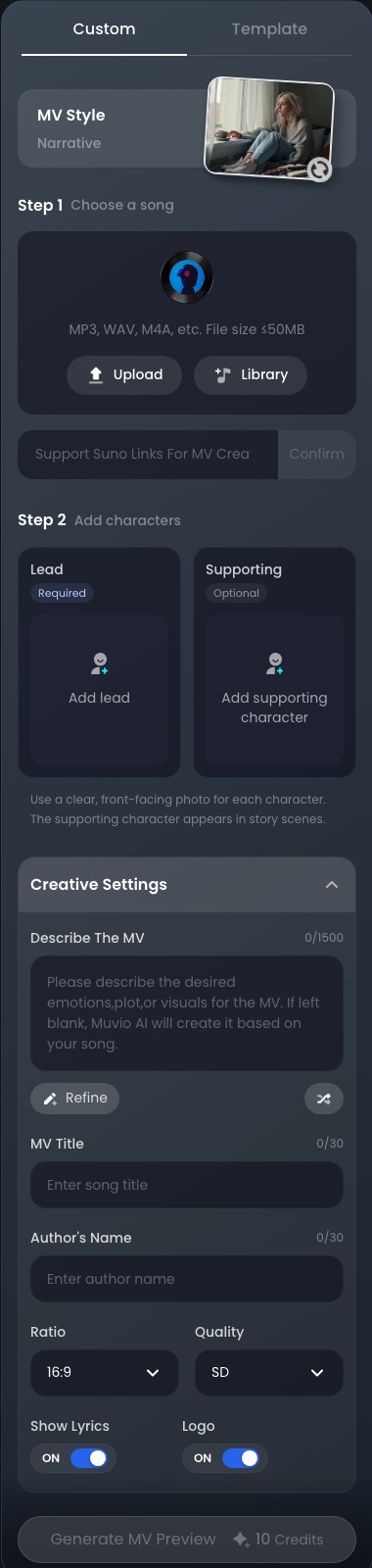
Muvio music video creation panel: choose a song, add characters and generate an MV preview
Muvio
HomeAI MV StudioPremium MVAI Audio LabSubscribe
Privacy PolicyTerms of Service
[email protected]
LanguageEnglishEspañolFrançaisDeutschItaliano日本語한국어Português (Brasil)中文(繁體)